I want to write a longer blog post today about how I architected and developed my most recent project, Lingo. I also want to talk about what I learned while working around the constraints of serverless compute, and how Vercel’s architecture allowed my backend to work. I spent some time reading about what Vercel is doing under the hood, and I found it super interesting, so I wanted to share that too.
context on the app and its architecture
I built Lingo for Purdue’s ECE 570, where I was tasked with creating an AI-native app for a specific stakeholder. I reached out to my mentor from Vanguard, Khanh Tran, who was learning Arabic and wanted a way to learn vocabulary before reading books or watching movies. The idea was that he could make flashcards for important words before immersing himself in the media, so he could spend more time actually reading or watching and less time pausing to look things up.
Vercel has been my go-to for frontend hosting since I started building web apps. This portfolio and blog are hosted there too. I love how easy it is to get an app up and running, so I wanted to use Vercel for both Lingo’s Next.js frontend and FastAPI backend. I had never hosted a backend there before, though, so this was a new learning curve for me.
Unlike a traditional long-running server, a serverless backend runs on instances managed by the cloud provider. An instance may be reused, but a later request is not guaranteed to reach the same one. For Lingo, that meant:
- I could not rely on keeping the app’s state in the backend’s memory between requests. Persistent data would need to live somewhere else.
- Vercel Functions had a 4.5 MB request body limit, which was a problem for sending large PDFs to the backend. Vercel Functions limits
- I capped each PDF upload at 4 MiB (about 4.19 MB) to leave room for the rest of the request, so I needed a way to handle books much larger than that.
personal background
Before diving into Lingo, I want to share a little background on my experience designing serverless apps. You can skip this section if you are bored lol. My work at Vanguard helped me think through this project. I am not sure whether I can share the architecture of the app I built there, but I can talk about another design I made for possible future implementation, if my team actually wants it lol.
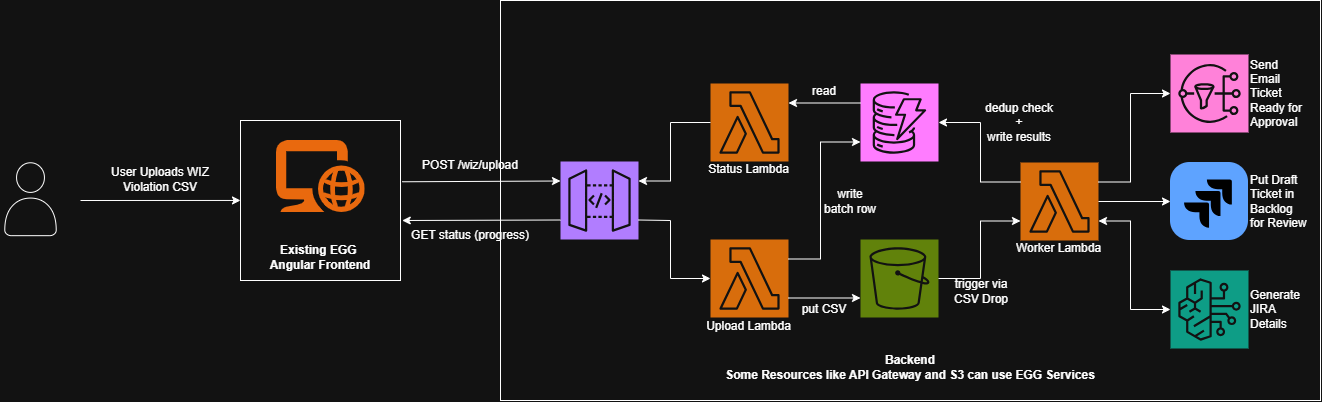
Over the summer at Vanguard, I built a serverless app to generate data for testing my team’s apps. I also designed a BAU automation bot that takes a CSV of compliance violations and creates draft Jira tickets for my team to review. This was one of my favorite architectures to design because the upload, processing, and progress checks could each run independently.
 view full-resolution diagram ↗
An upload Lambda saves the CSV to S3 and records the batch in DynamoDB. The S3 upload triggers a worker Lambda, which checks for duplicates, generates ticket details, and puts draft tickets in Jira for review. A separate status Lambda reads from DynamoDB so the frontend can show progress while the worker runs.
That design gave me a concrete example of how to split up work in a serverless app and keep track of it between requests. When I started Lingo, I was working with a much smaller use case and wanted to see how much of that coordination I could handle in the browser.
designing lingo
To start, I do not think serverless was necessarily the ideal fit for this app. Large book PDFs and movie subtitles can involve a lot of data and processing time, which were exactly the constraints I had to work around. A long-running process could hold state while it worked, although I would still need a way to get a large file to it in the first place. I have not worked extensively with that problem, but one approach I would explore is uploading the file to a document store like S3 and having the backend retrieve it.
That being said, Lingo was a class project, and I really wanted to stay on Vercel’s free tier. I also wanted a straightforward frontend and backend without adding a database or external storage. Those choices kept hosting simple, but they meant I had to get creative about getting large PDFs and subtitle files to FastAPI.
extracting text from pdfs
 view full-resolution diagram ↗
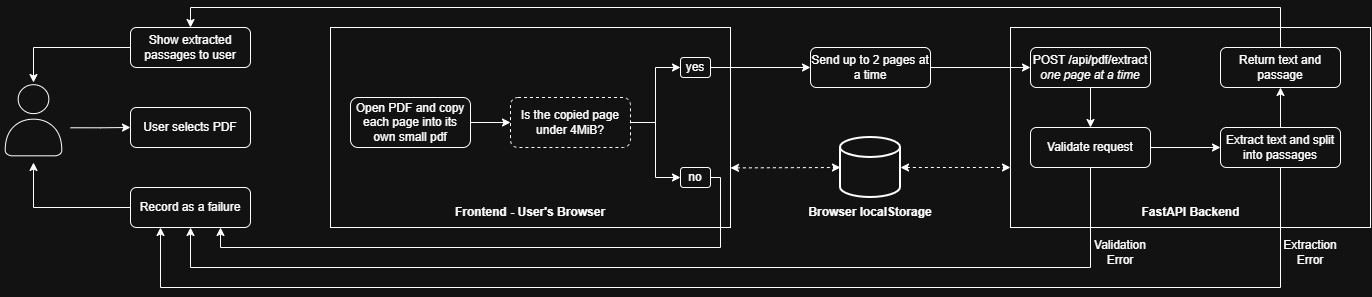
I split the PDF in the browser by copying each page into its own smaller PDF. Each request sent one page, and the browser could have up to two page requests in flight at once. If a page was too large, the browser recorded it as a failure. FastAPI validated each request, extracted the text, and split it into passages before sending it back. The user could then choose which passages to practice with, and Lingo saved them in the browser’s localStorage. Since I was storing plain text, that was enough for my small, single-user app. Movie subtitles followed a similar flow.
In this design, the browser acts as the orchestrator. It keeps track of which pages have been processed and sends the next ones. One drawback is that refreshing or leaving the page interrupts extraction. A large PDF can also take several minutes to process, even with two page requests going at a time. I thought this was a reasonable tradeoff for the project: the browser could coordinate the work without another service, but the user had to keep the page open and wait for it to finish.
generating flashcards
 view full-resolution diagram ↗
Once I had a way to extract text, the next challenge was generating hundreds of flashcards from the passages the user selected. Sending all those passages at once could run into the same request-size problem as the PDFs, so I sent them in batches. The frontend kept track of how it grouped the passages so it could match each flashcard back to the passage it came from. That mattered because I wanted the user to be able to connect a word back to the context they would see in their book or movie.
Each batch contained several passages, and we generated about three to five cards per passage on average. FastAPI sent concurrent requests to OpenAI for the passages in that batch, validated and combined the flashcards, and returned them to the frontend. The browser waited for that response before sending the next batch. Once all the batches were done, Lingo saved the cards to localStorage so the user could practice with them.
reflection and vercel’s fluid compute
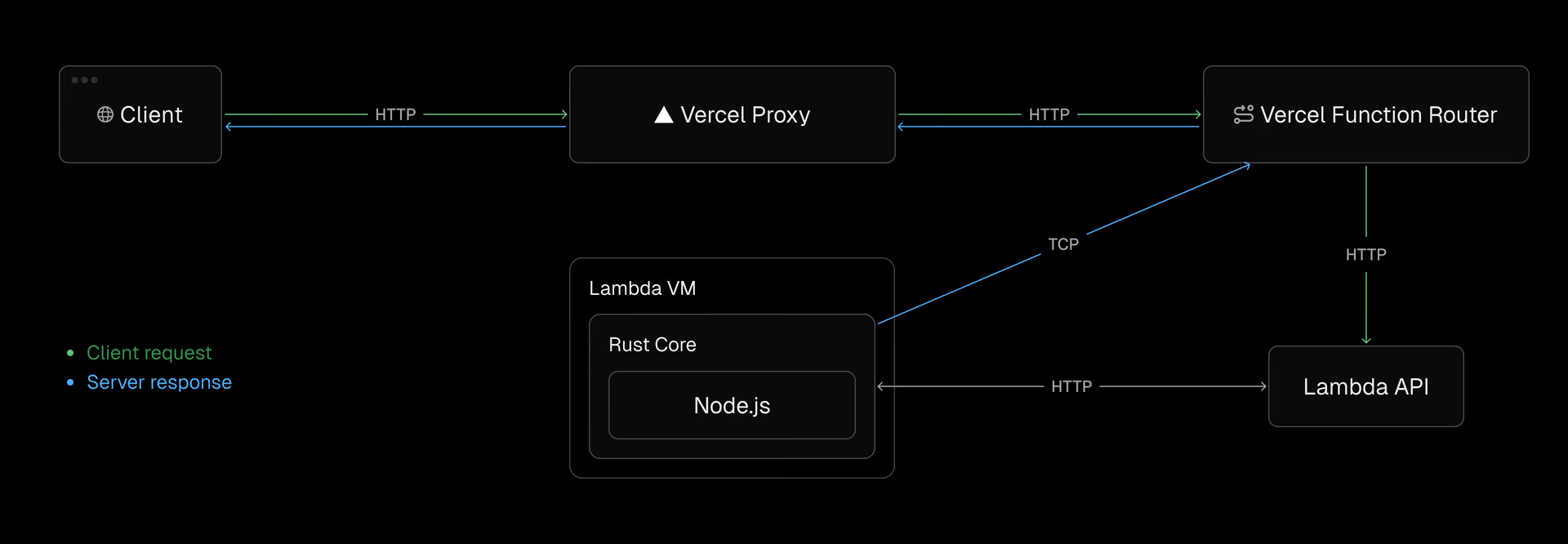
I got curious about what Vercel was doing underneath my FastAPI app and started reading about Fluid compute. Vercel traces it back to React Server Components. The Next.js team wanted to stream parts of the UI to the browser as they became available. Vercel Functions ran on AWS Lambda, which didn’t support streaming responses at the time, so Vercel built a TCP connection between its Function Router and the Lambda instance to send back pieces of the response. That work became the foundation for Fluid compute. How Vercel built Fluid compute
 view full-resolution diagram ↗
This made me think back to what happens when Lingo generates flashcards. The browser sends a batch to my FastAPI backend, and the backend spends part of that request waiting for responses from OpenAI. I was curious what the serverless instance could do during that waiting time, especially if another request came in.
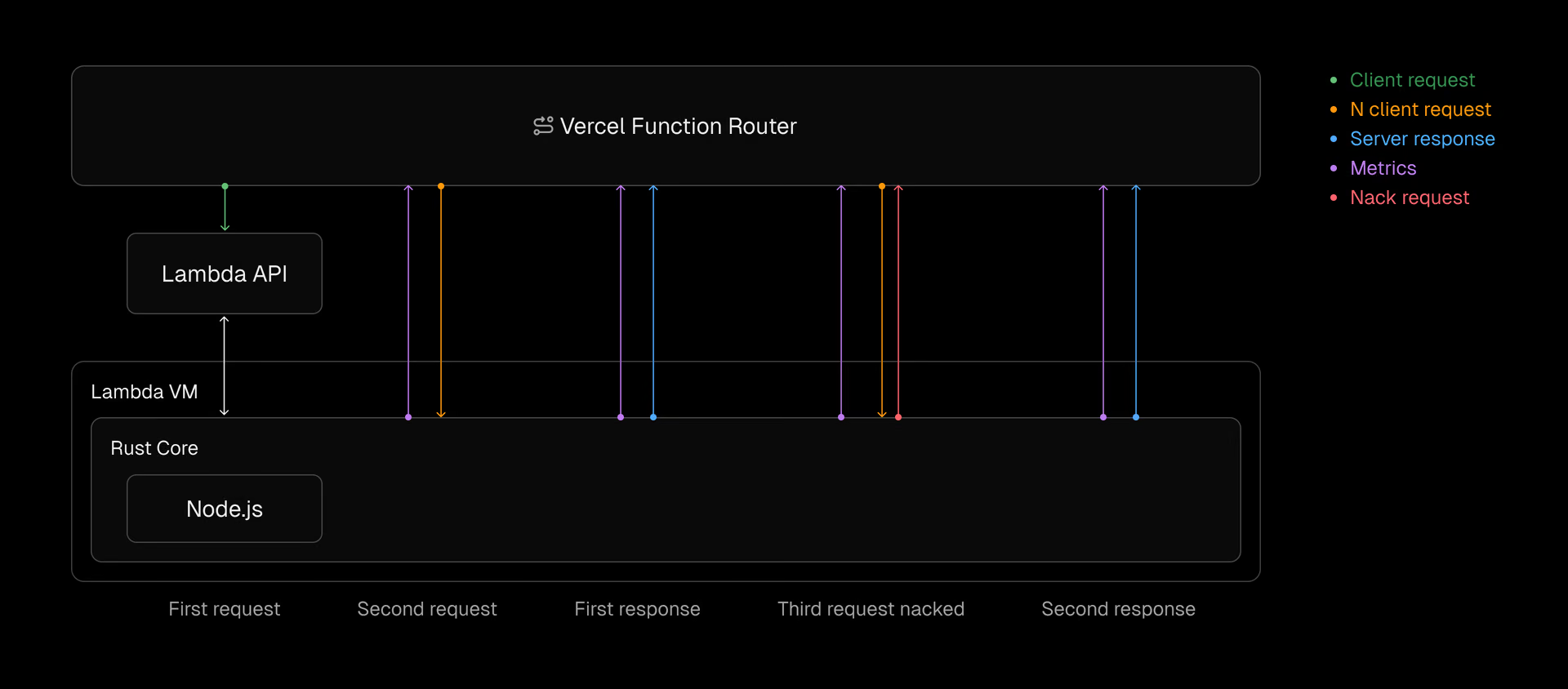
That is where Fluid compute gets interesting to me. Vercel can run multiple incoming requests on the same function instance at the same time, instead of needing a separate instance for each request. So while one request is waiting on an external API, the instance can make progress on another. Vercel can use existing capacity before starting more instances, which can reduce cold starts and make better use of resources. Vercel’s Fluid compute docs
There are two different kinds of concurrency here, and it took me a moment to separate them. Inside one Lingo batch request, FastAPI makes several OpenAI calls concurrently. Fluid compute operates at a different level: it can let multiple incoming requests share an instance. Since Lingo sends its flashcard batches one at a time, that second kind would matter when separate requests overlap, such as requests from different users; it does not make one batch’s OpenAI calls concurrent by itself.
 view full-resolution diagram ↗
conclusion
Looking back, this was probably not the most efficient architecture I could have chosen for processing large files. My priority was keeping hosting simple and inexpensive while still building something useful for Khanh, so I was willing to work around those constraints. For his use case, sending flashcard batches one at a time and keeping the page open were acceptable tradeoffs. Lingo does what I built it to do, and PDF parsing is still the biggest rough edge. If I turned it into a consumer app, I’d look at uploading large PDFs directly to something like S3 and processing them in the background. That way, users could leave the page and come back to their results. I’d also measure how long large files take to process and what they cost before deciding how much of the architecture to change.
I leaned on AI for implementation and to bounce around ideas. A lot of my work was figuring out which ideas fit the project and tweaking them until they worked for Khanh. I’m happy with what I learned, and I think I can use it on upcoming projects like Scent Radar, my fragrance price tracking platform.